Including resources
Native code sometimes requires additional resources, such as layout or image files. These work in slightly different ways on Android and iOS but can be easily included in plugins for both.
Android
To include resources they must be placed in the plugin/android/res folder, once there the inspector project can be updated and the resource files will be included.
For more information about what kind of resources can be added to your plugin and how they can be used with the Android SDK, see the official Android docs concerning App Resources.
Important
Resources must be accessed dynamically from your Java code: ForgeApp.getResourceId is a helper method which lets you access the ID for a named resource.
iOS
On iOS, any resources included in your plugin must be part of a bundle.
3rd party bundles can be included by placing the bundles in plugin/ios/bundles. An inspector project update will then be required to include them in the inspector for development
If you have resources such as images that you want to include in your plugin, you must create your own bundle. The inspector project includes a ForgeModuleResources target which can be used to help with this:
All bundles must have a unique name - you can name your bundle by setting the Product Name for the ForgeModuleResources target.
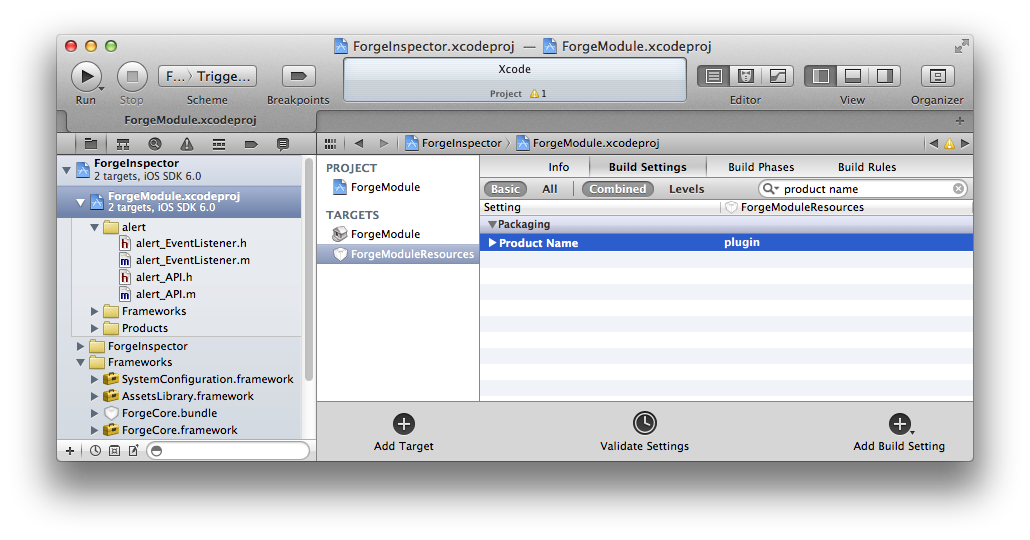
Add the required resources to the ForgeModule project and include them in the ForgeModuleResources target.
Use the named bundle to reference these resources from your native code, with code like this:
NSString * bundlePath = [[NSBundle mainBundle] pathForResource:@"my_bundle_name" ofType:@"bundle"];
NSBundle * myBundle = [NSBundle bundleWithPath:bundlePath];
For more information, see Accessing a Bundle's Contents.
When building UniversalForgeModule your bundle will be output in the build folder: make sure to include this in ios/bundles/ in your plugin folder.
After adding the bundle to ios/bundles, you'll need to re-generate your Inspector before continuing.