notification: Notifications
Config
The notification module must be enabled in config.json
{
    "modules": {
        "notification": true
    }
}
API
Notifications allow you to send alerts.
create
Platforms: All
- notification.create(title, text, success, error)
Arguments: - title (string) -- title
- text (string) -- notification message
- success (function()) -- success
- error (function(content)) -- called with details of any error which may occur
setBadgeNumber
Platforms: iOS
Allows you to set or remove a badge for your app's icon on the iOS home screen:

If you pass in 0 as number, it will remove this badge. This is particularly useful if you want to clear a badge set by a push notification.
- notification.setBadgeNumber(number, success, error)
Arguments: - number (string) -- number
alert
Platforms: Android, iOS
Show a dialog window with text content that the user can dismiss. Similar to using window.alert except you can control the title text for the dialog.
To create an alert like this:
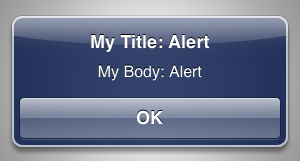
You would use this code:
forge.notification.alert("My Title: Alert", "My Body: Alert", function () {
  // ... implement logic for when user dismissed alert
});
- notification.alert(title, body, success, error)
Arguments: - title (string) -- text to show as the title of the dialog
- body (string) -- text to show as the body of the dialog
- success (function()) -- called when the user dismisses the alert
- error (function(content)) -- called with details of any error which may occur
confirm
Platforms: Android, iOS
Show a dialog window prompting the user with a "yes"/"no" style question.
To show a confirmation dialog like this:
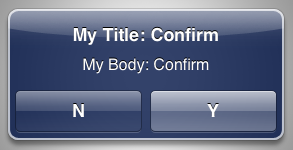
You would use this code:
forge.notification.confirm("My Title: Confirm", "My Body: Confirm", "Y", "N", function (userClickedYes) {
  if (userClickedYes) {
    // ... implement logic for when user clicked "Y"
  } else {
    // ... implement logic for when user clicked "N"
  }
});
- notification.confirm(title, body, positive, negative, success, error)
Arguments: - title (string) -- text to show as the title of the dialog
- body (string) -- text to show as the body of the dialog
- positive (string) -- text to use for the positive action button
- negative (string) -- text to use for the negative action button
- success (function(result)) -- called with true if the user selected the positive option, false if they selected the negative option.
- error (function(content)) -- called with details of any error which may occur
toast
Platforms: Android, iOS
Create a small popup which disappears after a few seconds.

- notification.toast(body, success, error)
Arguments: - body (string) -- body
- success (function()) -- called if the toast is displayed successfully
- error (function(content)) -- called with details of any error which may occur
Permissions
On Chrome this module will add the notifications permission to your app, users will be prompted to accept this when they install your app.
On Android this module will add the VIBRATE permission.